
Walmart eGift cards arrive by email and can be spent at Walmart stores, on walmart.com and in the Walmart app. They’re one of the most flexible gift cards you can get, since Walmart sells groceries, household basics, electronics and almost everything in between. Here’s how to add yours to your account, pay with it online or at the register, check what’s left, and avoid the scams that use Walmart cards as bait.
Table of Contents
How to use a Walmart eGift card online
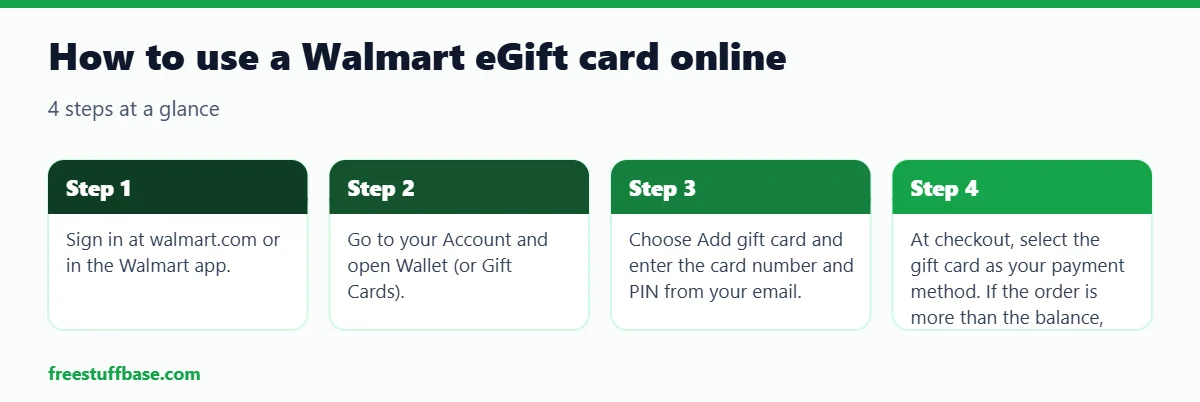
The easiest way is to save it to your Walmart account:
- Sign in at walmart.com or in the Walmart app.
- Go to your Account and open Wallet (or Gift Cards).
- Choose Add gift card and enter the card number and PIN from your email.
- At checkout, select the gift card as your payment method. If the order is more than the balance, add another payment method for the rest.
Once the card is in your wallet, you don’t need to dig out the email again. It also works for pickup and delivery orders placed on walmart.com or in the app.
How to use a Walmart eGift card in store
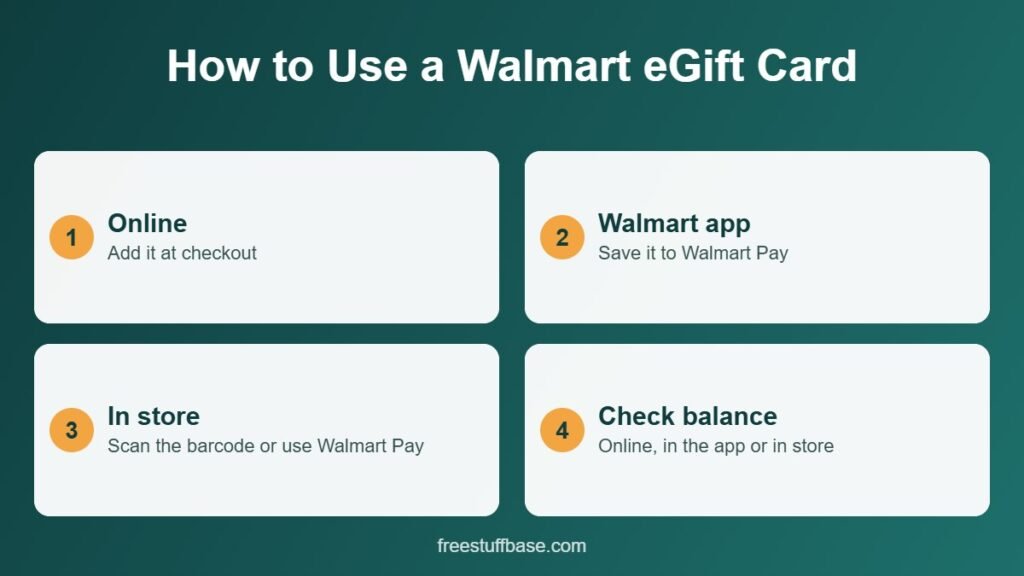
You have a few options at the register:
- Show the barcode from the eGift email on your phone, or print the email and bring it.
- Use Walmart Pay in the app: if the card is saved in your Walmart account wallet, you can pay at checkout using the app’s scan-to-pay feature.
- Tell the cashier you’re paying with an eGift card if the barcode won’t scan; they can usually enter the number manually.
At self-checkout, scan the barcode when the screen asks for payment. If it doesn’t work, ask the self-checkout attendant for help instead of trying repeatedly.
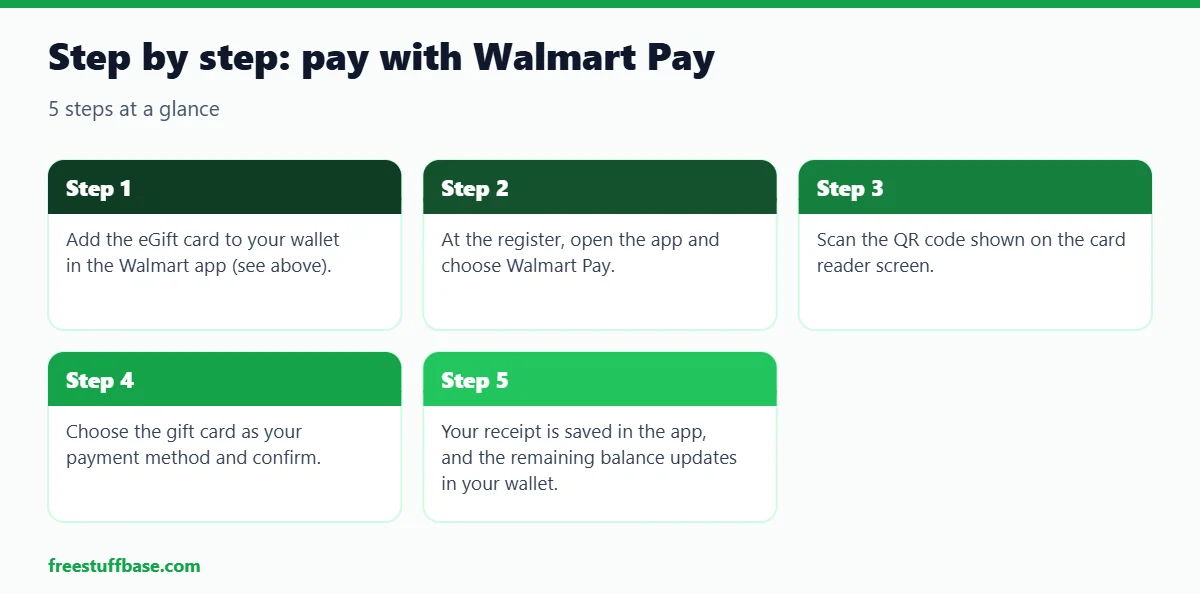
Step by step: pay with Walmart Pay
- Add the eGift card to your wallet in the Walmart app (see above).
- At the register, open the app and choose Walmart Pay.
- Scan the QR code shown on the card reader screen.
- Choose the gift card as your payment method and confirm.
- Your receipt is saved in the app, and the remaining balance updates in your wallet.
How to check your Walmart eGift card balance
- In your account: saved gift cards show their balance in your Walmart account wallet.
- Online: use the gift card balance page on walmart.com with the card number and PIN.
- In store: ask a cashier or the customer service desk.
- On your receipt: the remaining balance is printed after each purchase.
Checking your balance is always free. Only check it on walmart.com, in the app or at a store, never through a link in a text message or ad.
Tips to stretch your Walmart eGift card
- Spend it on essentials: groceries, diapers and household basics are an easy way to free up cash in your budget.
- Use rollbacks and clearance: check the app for rollback prices before you shop.
- Stack with coupons: manufacturer coupons still work when you pay with a gift card. New to couponing? Start with our couponing for beginners guide.
- Add cash back: scan your Walmart receipt in a receipt app, or use one of the best cashback apps, for a little extra back.
How to use a Walmart eGift card at self-checkout
- Scan all your items as usual.
- When the screen asks how you’d like to pay, choose Gift Card.
- Scan the barcode from your eGift email on your phone, or use Walmart Pay if the card is saved in your app wallet.
- If the barcode won’t scan, turn up your screen brightness and hold the phone flat under the scanner.
- If the balance doesn’t cover everything, pay the rest with cash, debit or credit.
Self-checkout scanners sometimes struggle with phone screens. A printed copy of the email, or Walmart Pay, is usually the fastest fix.
Walmart eGift card vs. physical Walmart gift card
| Walmart eGift card | Physical gift card | |
|---|---|---|
| How it arrives | By email, usually within minutes | Plastic card in store or by mail |
| Use online and in the app | Yes, with card number and PIN | Yes, with card number and PIN |
| Use in store | Show barcode or use Walmart Pay | Hand it to the cashier |
| Easy to lose? | Hard to lose if saved to your wallet | Easy to lose or misplace |
| Best for | Last-minute gifts, sending far away | Birthday cards and in-person gifts |
Using more than one gift card and leftover balances
Walmart has allowed shoppers to use up to five gift cards on one online order and combine them with a credit or debit card. If your order costs less than your card balance, the rest stays on the card for next time. In store, you can hand over several cards, one after another, before paying the remainder.
Returns and refunds on items bought with a Walmart eGift card
If you return something you paid for with a Walmart eGift card, the refund usually goes back as gift card credit rather than cash. Keep your receipt, either the paper copy or the one saved in the app, because it makes returns faster and shows how you paid.
Walmart eGift card not working? Try this
- Check the PIN. Online and app orders need both the card number and the PIN from the email.
- Check the balance. Make sure the card hasn’t already been used or added to someone else’s account.
- Switch devices. Clear your browser cache, try another browser, or use the Walmart app instead.
- Wait for activation. Recently bought cards can take a short time to work.
- Contact Walmart customer care through walmart.com or the app with the card number and order details if it still fails.
Walmart eGift card vs. other eGift cards sold at Walmart
Walmart also sells eGift cards for other brands (restaurants, streaming, gaming and more). Those are not Walmart gift cards and must be used with the brand they’re for. Check their balance on that brand’s website. For example, a Target card works only at Target; see how to check your Target gift card balance.
eGift card email didn’t arrive?
- Check your spam, junk and promotions folders, and search for “Walmart”.
- Ask the sender to confirm the email address they used.
- If it’s still missing, the buyer can contact Walmart customer care with the order number.
Walmart eGift card scams to watch for
Walmart and the FTC warn about scams where someone asks you to buy gift cards, including Walmart eGift cards, and send them the numbers. Common stories include:
- “Your Social Security number has been suspended” or “You owe the IRS.”
- “Your grandson is in jail and needs bail money.”
- “You’ve won a prize – pay a fee with gift cards to claim it.”
- “We overpaid you – refund us with a gift card.”
- “You’ve been selected for a free $500 Walmart gift card” in a text or pop-up.
No legitimate government agency, utility or business will ask you to pay with gift cards. If you’ve sent gift card numbers to a scammer, contact Walmart’s customer care right away and report it at ReportFraud.ftc.gov. For honest ways to earn gift cards, see our guide to free eGift cards.
Walmart eGift card uses compared
Competing guides explain one method at a time. This table shows every way to use a Walmart eGift card so you can pick the easiest option.
| Where | How to use it | Good to know |
|---|---|---|
| Walmart.com | Add the card number and PIN at checkout or save it to your account | Works for delivery and pickup orders |
| Walmart app | Add the card to your wallet and pay at checkout | Lets you see the balance anytime |
| In store with Walmart Pay | Scan the QR code at the register with the app | No need to show the email |
| In store with the barcode | Show the eGift email barcode to the cashier | Brightness up helps the scanner read it |
Using a Walmart eGift card for Walmart+ and pickup orders
A Walmart eGift card can be used on many online orders, including pickup and delivery. If you have a Walmart+ membership, check your account payment settings to see whether gift card balances can be applied to membership fees. Rules change over time, so confirm in your account before you rely on it.
- Choose pickup to avoid delivery fees on smaller orders.
- Add a backup card in case the final total changes after substitutions.
- Check the order receipt to see how much of your Walmart eGift card balance was used.
What a Walmart eGift card can buy
| Balance | Ideas |
|---|---|
| $25 | A week of pantry staples, cleaning supplies or school supplies |
| $50 | A full grocery top-up, a small kitchen appliance, toys |
| $100 | Household essentials for a month, a video game, home decor |
| $250 and up | Electronics, furniture, a big grocery stock-up |
Ways to make your Walmart eGift card go further
- Compare prices with Rollbacks and clearance items before spending.
- Use the app’s price and product search to compare sizes and unit prices.
- Buy store brands like Great Value and Equate for everyday items.
- Use pickup to avoid impulse buys in the aisles.
- Combine a Walmart eGift card with a cashback app where allowed.
Sending a Walmart eGift card as a present
A Walmart eGift card is one of the most practical presents you can send, because almost everyone shops at Walmart. You can usually choose a design, add a personal message and schedule delivery by email.
- Double-check the recipient’s email address before you pay.
- Schedule delivery for the morning of the occasion.
- Let the person know to look in their spam folder if the email does not arrive.
- Keep your order confirmation in case the email needs to be resent.
Walmart eGift card security checklist
- Only enter your card details on walmart.com or in the official Walmart app.
- Never read a Walmart eGift card number to someone over the phone who contacted you first.
- Walmart and government agencies will never ask you to pay fines or bills with gift cards.
- Delete eGift emails only after the balance has been fully used.
- Report scams to the FTC at ReportFraud.ftc.gov.
FAQ
Do Walmart eGift cards expire?
Walmart gift cards don’t have an expiration date. Check the terms in your email for details.
Can I use a Walmart eGift card at Sam’s Club?
Sam’s Club is owned by Walmart but runs its own gift card program. Acceptance rules can change, so ask at your Sam’s Club before relying on a Walmart card there.
Can I transfer my Walmart eGift card balance to someone else?
You can forward the eGift email to someone you trust before it’s added to an account. Once it’s in your wallet, it’s tied to your account.
Can I use more than one gift card on an order?
Yes. You can save several gift cards in your wallet and apply them at checkout, then pay any remaining amount with another method.
Can I use a Walmart eGift card without the app?
Yes. Show the barcode from the email on your phone or bring a printed copy to the register.
Can I get cash back from a Walmart eGift card?
No. Walmart eGift cards can’t be exchanged for cash, except where state law requires it for small balances.
Can I use a Walmart eGift card for pickup and delivery?
Yes. Save it to your Walmart account wallet and choose it as your payment method when you check out for pickup or delivery.
Can I print a Walmart eGift card?
Yes, you can usually print the eGift email and show the barcode at the register, or show it on your phone.
Can I use a Walmart eGift card at Sam’s Club?
Sam’s Club is owned by Walmart, but its payment rules are set separately. Check Sam’s Club’s current accepted payment methods or ask at the club before you plan to use a Walmart eGift card there.
Final thoughts
The simplest way to use a Walmart eGift card is to add it to your Walmart account wallet: it then works online, for pickup and delivery, and in store with Walmart Pay. Check your balance only on walmart.com, in the app or at the register, and never send gift card numbers to anyone who contacts you asking for payment.

Md. Emam Hasan is the founder of Freestuffbase and a digital marketer and SEO specialist based in Dhaka, Bangladesh. He researches free samples, gift card policies and sweepstakes rules from official sources, and writes practical guides to help readers save money and avoid scams. More at emamit.com.